Temporal Smoothing
Temporal Smoothing filters each node's 3D position over time, after triangulation: a median first, which removes one-frame spikes, then a Gaussian, which removes jitter. Both are off by default.
It changes only the 3D. Your 2D labels and predictions stay as they are, and the reprojections follow the smoothed 3D. Each node's x, y and z are filtered on their own, one animal at a time, so run it after you have proofread identities: smoothing across an ID swap blends two animals into one.
Running it
Set the windows in Help ▸ Settings ▸ Temporal Smoothing, then use Smooth ▾ in the toolbar. A click on the button smooths all frames, and its menu also has This frame and Remove smoothing. Each run starts again from the 3D from before smoothing, so runs replace each other and never add up.
Median window
Each frame takes the middle value of the frames in its window. These sketches show one node's x position over 40 made-up frames, filtered by LUC3D's own code.
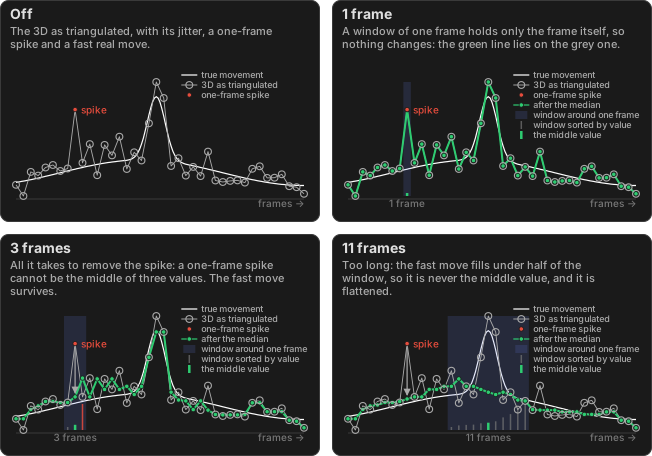
A short window is usually all you need. The stems at the bottom of each window are its values sorted from lowest to highest, and the green one is what the frame becomes.
Gaussian window
Each frame becomes a weighted average of the frames in its window. The frame itself counts most, and the weights fall off as a bell curve (the stems). The window spans ±3 sigma. The Gaussian runs on the median's output, here a median of 3 frames, because it would otherwise spread a spike into a bump.
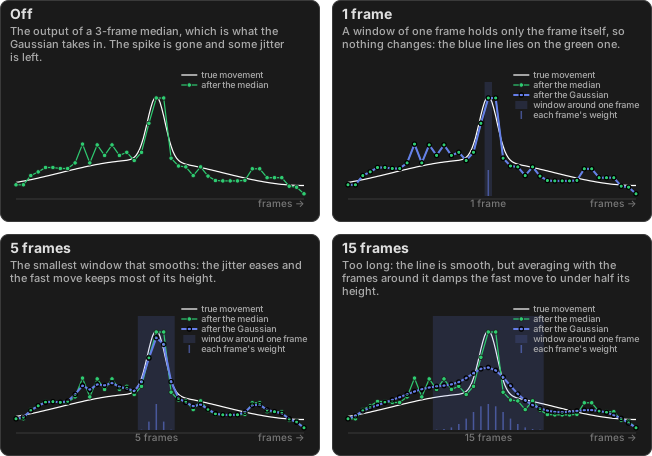
A window of 3 barely changes anything, and 5 is the smallest that smooths.
Gaps
Missing 3D is never filled in. Two settings decide what happens around it:
| Setting | Default | What it does |
|---|---|---|
| Max gap to smooth across | 5 frames | An absence up to this long is a hole inside a segment, and the windows skip over it. A longer one splits the trace, and no window reaches across the split. |
| Minimum segment length | 5 frames | A segment shorter than this is left as it is. |
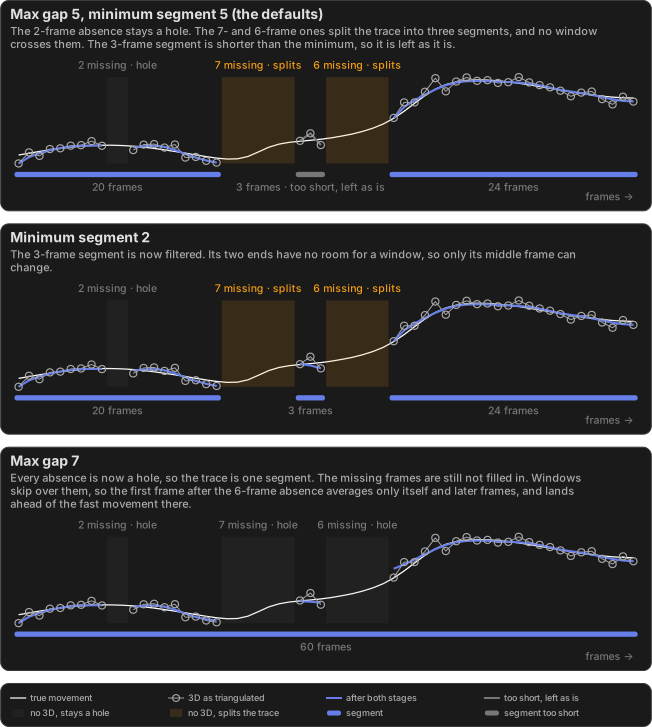
Near a segment's ends the window shrinks evenly, so smoothing is weakest there.
Try the reprojection error threshold first
The reprojection error threshold removes a cause of jitter, but it also leaves nodes without 3D, and gaps are where a filter is least accurate. Turning both up hard is worse than either alone, so set the threshold first, then smooth what is left.